August 10, 2026
A Command Line Interface takes a core set of functions and exposes them as a shell utility. An HTTP server can take the same functions and expose them over a network while an MCP can expose them to AI agents. One functional core, many views. In each case, the interface is boilerplate where the best design is the most boring design. Creativity in an API or CLI is like creativity in spelling: iritating. So why not automatically derive the views from the functions? The Morloc compiler does exactly this.
As a strongly-typed polyglot compiler, Morloc is uniquely suited for this problem. It knows all function types, fully manages serialization, and propagates docstring hints through to code generation. And this can be done across languages, ensuring consistency.
Here is a Morloc program that renders the Mandelbrot set with the escape-time computed in Rust and the image rendered in Python:
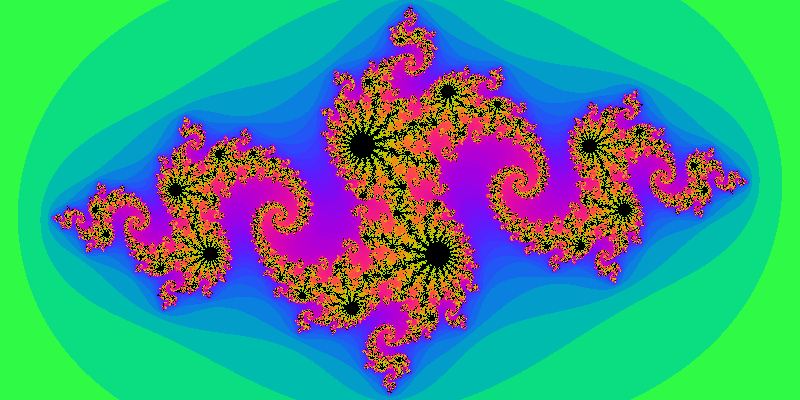 And Julia too!
module fractals (mandel, julia)

import tensor-rust
import tensor-py

source Rust from "mandel.rs"
  ( "julia_grid" as julia
  , "mandel_grid" as mandel
  )

--' Render the Mandelbrot set over a viewport.
--' @render -a/--ascii=asAscii @default
--' @render -p/--ppm=asPpm
--' @render -g/--png=asPng
mandel :: View -> Matrix I64

--' Render a Julia set
--' @render -a/--ascii=asAscii @default
--' @render -p/--ppm=asPpm
--' @render -g/--png=asPng
julia ::
  --' Real part of the Julia constant
  --' @arg -r/--real
  --' @default -0.8
  F64 ->
  --' Imaginary part of the Julia constant
  --' @arg -i/--imaginary
  --' @default 0.156
  F64 ->
  View ->
  Matrix I64

-- continued in next Morloc code block
Rust tensor definitions are imported from the tensor-rust Morloc module. The
mandel function is sourced from Rust and mapped to a Morloc type. The View
type is a record that is defined in the following Morloc lines:
--' Viewport controls.
--' @unroll
record View where
  --' Real part of the view center
  --' @arg --center-x
  --' @metavar X
  --' @default -0.5
  centerX :: F64

  --' Imaginary part of the view center
  --' @arg --center-y
  --' @metavar Y
  --' @default 0.0
  centerY :: F64

  --' Magnification (higher = deeper zoom)
  --' @arg --zoom
  --' @metavar Z
  --' @default 1.0
  zoom :: F64

  --' Output width in cells
  --' @arg --width
  --' @metavar COLS
  --' @default 80
  width :: I64

  --' Output height in cells
  --' @arg --height
  --' @metavar ROWS
  --' @default 40
  height :: I64

  --' Escape-iteration ceiling
  --' @arg --max-iter
  --' @metavar N
  --' @default 200
  maxIter :: I64

record Rust => View = "View"

-- continued in final Morloc code block
The Morloc type definition provides docstring hints to the record that is passed to the downstream code generators. The record will be unrolled in the interfaces as a collection of optional parameters.
The raw wrapped functions deal with the fundamental data – numeric matrices in
this case. The @render fields associate renders that take the function output
and transform it into a binary or textual output. These can be written in any
supported language. Writing them in Rust would have better performance since
there would be no data marshalling costs, but I’ve opted for Python here for
prototyping convenience.
--' @mime image/png
type PNG = Vector U8

--' @mime image/x-portable-pixmap
type PPM = Vector U8

source Py from "render.py"
  ( "as_ascii" as asAscii
  , "as_ppm"   as asPpm
  , "as_png"   as asPng
  )

--' Shade the grid into terminal ASCII art.
asAscii :: Matrix I64 -> Str

--' Encode the grid as a binary PPM (P6) image.
asPpm :: Matrix I64 -> PPM

--' Encode the grid as a PNG image with a smooth colormap (Pillow).
asPng :: Matrix I64 -> PNG
The Rust and Python sourced code is entirely idiomatic. The data inputs and outputs are natural data structures. There are no Morloc dependencies.
The Rust code is just 57 lines, summarized below:
#[allow(non_snake_case)]
#[derive(Clone)]
pub struct View {
    pub centerX: f64,
    pub centerY: f64,
    pub zoom: f64,
    pub width: i64,
    pub height: i64,
    pub maxIter: i64,
}

// helper functions

pub fn mandel_grid(v: &View) -> ndarray::Array2<i64> { ... }

pub fn julia_grid(c_re: f64, c_im: f64, v: &View) -> ndarray::Array2<i64> { ... }
The Morloc View record maps the Rust View struct. Likewise, the sourced Python code for the image renderers is just normal Python code:
# render.py -- ordinary numpy; nothing from morloc appears here
def as_ascii(grid): ...   # numpy array in, string out
def as_ppm(grid):   ...   # numpy array in, PPM image bytes out
We can now compile and run this program and run it with the default ASCII renderer:
$ morloc make -o fractals fractals.loc
$ ./fractals mandel --zoom 1 --width 56 --height 26
,,,,,,,;;iiiiiiiiiiiirrrrrrssXXA@@@32Xssrrriiii;;;;;;;;;
,,,,,,,;iiiiiiiiiiiirrrrrssXXXA2@@@@AXXXssriiiii;;;;;;;;
,,,,,,;;iiiiiiiiiiirrrrssX25AA22H@@52AAXX5sriiii;;;;;;;;
,,,,,,;iiiiiiiiiiirrrsssXXhGh5G@@@@@@@2A2MAriiiii;;;;;;;
,,,,,,;iiiiiiiiirrsssssXXA2@@@@@@@@@@@@h@5Xsriiii;;;;;;;
,,,,,;iiiiiiiirrssssssXXX35@@@@@@@@@@@@@9AXsriiiii;;;;;;
,,,,,;iiiiiirrsXXXXXXXXXA#@@@@@@@@@@@@@@@HAsrriiii;;;;;;
,,,,,iiiirrrrsXAAAAMAXAAMh@@@@@@@@@@@@@@@M5Xrriiiii;;;;;
,,,,,iirrrrrssXX2S2535AA#@@@@@@@@@@@@@@@@@AXrriiiii;;;;;
,,,,,irrrrrsssXX2#@@@@32h@@@@@@@@@@@@@@@@@5Xrriiiii;;;;;
,,,,,rrrrrsssAAAH@@@@@@h@@@@@@@@@@@@@@@@@@Asrriiiii;;;;;
,,,,irrrrXXXXA55@@@@@@@@@@@@@@@@@@@@@@@@@@Xsrrriiiii;;;;
,,,,rsXXAAAAM5@@@@@@@@@@@@@@@@@@@@@@@@@@@AXsrrriiiii;;;;
,,,,rsXXAAAAM5@@@@@@@@@@@@@@@@@@@@@@@@@@@AXsrrriiiii;;;;
,,,,irrrrXXXXA55@@@@@@@@@@@@@@@@@@@@@@@@@@Xsrrriiiii;;;;
,,,,,rrrrrsssAAAH@@@@@@h@@@@@@@@@@@@@@@@@@Asrriiiii;;;;;
,,,,,irrrrrsssXX2#@@@@32h@@@@@@@@@@@@@@@@@5Xrriiiii;;;;;
,,,,,iirrrrrssXX2S2535AA#@@@@@@@@@@@@@@@@@AXrriiiii;;;;;
,,,,,iiiirrrrsXAAAAMAXAAMh@@@@@@@@@@@@@@@M5Xrriiiii;;;;;
,,,,,;iiiiiirrsXXXXXXXXXA#@@@@@@@@@@@@@@@HAsrriiii;;;;;;
,,,,,;iiiiiiiirrssssssXXX35@@@@@@@@@@@@@9AXsriiiii;;;;;;
,,,,,,;iiiiiiiiirrsssssXXA2@@@@@@@@@@@@h@5Xsriiii;;;;;;;
,,,,,,;iiiiiiiiiiirrrsssXXhGh5G@@@@@@@2A2MAriiiii;;;;;;;
,,,,,,;;iiiiiiiiiiirrrrssX25AA22H@@52AAXX5sriiii;;;;;;;;
,,,,,,,;iiiiiiiiiiiirrrrrssXXXA2@@@@AXXXssriiiii;;;;;;;;
,,,,,,,;;iiiiiiiiiiiirrrrrrssXXA@@@32Xssrrriiii;;;;;;;;;
Or we can apply the PNG renderer:
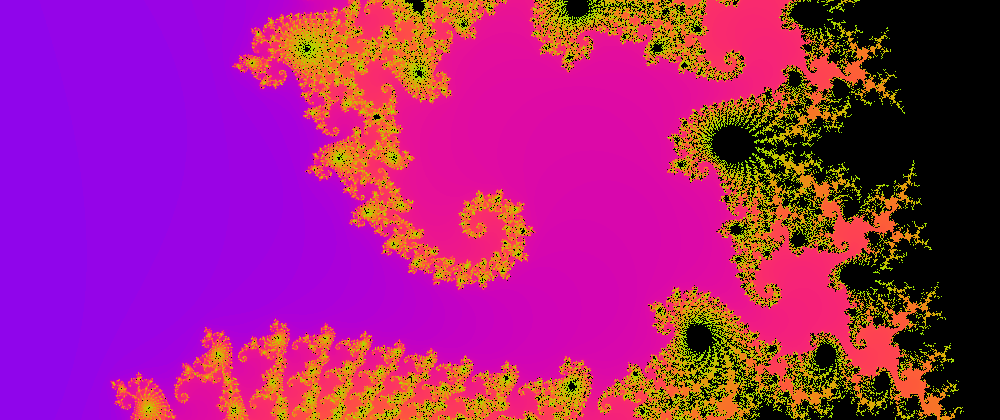
./spin mandel --center-x -0.743 --center-y 0.131 \
              --zoom 250 --max-iter 400 \
              --width 1000 --height 420 --png > mandel.png
Generating help statements
Given the function types and the associated docstring hints, Morloc can generate rich usage statements. We can view the top-level help where one subcommand for each exported term is displayed:
$ morloc make -o fractals fractals.loc
$ ./fractals -h
Usage: ./fractals <nexus_options> <command> <command_options>

Commands:
  mandel  Render the Mandelbrot set
  julia   Render a Julia set
And we can view the usage info for the individual subcommand:
$ ./fractals julia -h
Render a Julia set

Usage: ./fractals <nexus_options> julia <command_options>

General Options:
  -h, --help   Print help (see more with '--help')
  -a, --ascii  Shade the grid into terminal ASCII art.
  -p, --ppm    Encode the grid as a binary PPM (P6) image.
  -g, --png    Encode the grid as a PNG image with a smooth colormap (Pillow).

Optional arguments:
  -r, --real <F64>       Real part of the Julia constant
                         type: F64 [default: -0.8]
  -i, --imaginary <F64>  Imaginary part of the Julia constant
                         type: F64 [default: 0.156]
      --center-x <X>     Real part of the view center
                         type: F64 [default: -0.5]
      --center-y <Y>     Imaginary part of the view center
                         type: F64 [default: 0.0]
      --zoom <Z>         Magnification (higher = deeper zoom)
                         type: F64 [default: 1.0]
      --width <COLS>     Output width in cells
                         type: I64 [default: 80]
      --height <ROWS>    Output height in cells
                         type: I64 [default: 40]
      --max-iter <N>     Escape-iteration ceiling
                         type: I64 [default: 200]

Return:
  default:    Matrix _ _ I64
  -a/--ascii: Str
  -p/--ppm:   image/x-portable-pixmap
  -g/--png:   image/png
Note from the Usage line that CLI invocations separate the nexus_options
from the command_options. A Morloc CLI tool separates the namespace flags that are
shared between all Morloc CLIs from the namespace of flags that are unique to a
particular program. This allows the whole ecosystem of tools to gain new
features without conflicting with the argument space of the commands.
Two of these “nexus” options are --json-help and --mcp-tools which,
respectively, print the full machine-readable interface in JSON for the CLI and
for the MCP server (which we will cover soon).
$ ./fractals --mcp-tools | jq '.tools[].name'
"mandel"
"julia"

$ ./fractals --mcp-tools | jq '.tools[]|select(.name=="mandel").inputSchema.properties|keys'
["_render", "centerX","centerY","height","maxIter","render","width","zoom"]
In this way, all Morloc CLI tools offer machine-verified self-description.
These fractal CLIs focus on the rendered images. For the more common CLIs where
we want to directly access the output data, we have several built in options for
formatting. For tools where no default renderer is set, the default output is
the JSON representation of the functional return type (here a Matrix I64 type,
a matrix of 64-bit integers). To over-ride the default, we explicitly ask for
JSON formatting with the -f json option on the left of the subcommand:
$ ./fractals -f json mandel --width 8 --height 4
[[4,8],[1,2,3,4,13,4,2,2,1,4,10,11,200,200,3,2,1,4,10,11,200,200,3,2,1,2,3,4,13,4,2,2]]
Using JSON here is lossy and non-self-describing. We can alternatively use the Morloc binary format (VoidStar).
$ ./fractals -f packet -z 3 mandel --width 800 --height 400 > mandel.datHere we write data into compressed Morloc binary. This can be natively read by other Morloc CLI tools and is the natural medium for chaining Morloc tools together and storing cached data. In the future, I will write a dedicated post that presents Morloc VoidStar format and the efficient compression, streaming and parallelism that it enables.
Composing a new command
Morloc modules are not terminal – they can be imported into other Morloc programs and the functions can be re-exported or composed into new functions.
Here is a second Morloc program that imports the original fractals module,
re-exports mandel and julia and wraps a sweep over imaginary components
of the Julia set to create an GIF movie:
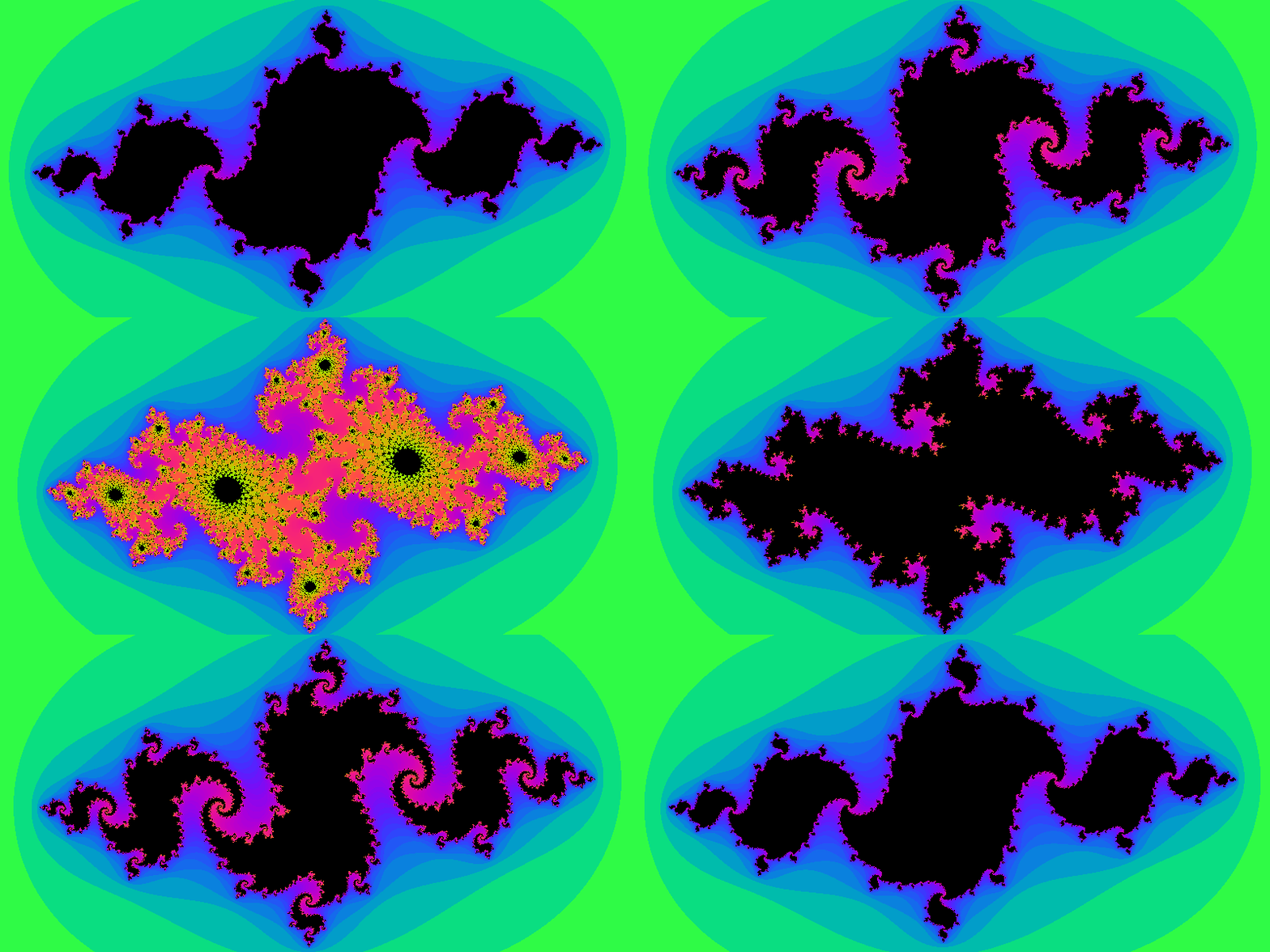 The Julia set visualized over real components from -0.9 to -0.7
module spin (mandel, julia, spin)

import root-rust (Functor)
import .fractals

--' @mime video/gif
type Gif = Vector U8

source Py from "render.py"
  ( "as_gif" as asGif )

--' Encode a sequence of iteration grids as an GIF.
asGif :: [Matrix I64] -> Gif

--' Make movie over Julia sweep
--'
--' @render --gif=asGif @default
spin ::
  --' Values for constant cRe
  [F64] ->
  --' Imaginary part of the Julia constant
  F64 ->
  View -> [Matrix I64]
spin cs cIm v = map (\c -> julia c cIm v) cs
This post emphasizes Morloc as an interface generator, but it is also fully
featured polyglot programming language with typeclasses, generics, higher-order
functions, recursion and other abstractions. In the code above, the julia
function is mapped over a given list of inputs and the resulting list of
matrices is converted by a custom renderer to an GIF.
Inputs, such as the list of real constant components above, can be passed in
many ways. For list-shaped data, Morloc first parses them a JSON strings (e.g.,
[-0.9,-0.8] and then as files formatted as Morloc binary packets, MessagePack
or JSON. The inputs formats that are supported depend on the Morloc data type
and on special docstring directives. The full power of the input system would
merit its own post (or you could read the docs).
In the example below, I provide a JSON file for the real components:
$ morloc make spin.loc
$ ./main spin julia-values.json 0.156 --center-x 0 --width 800 --height 400 > spin.gif
The same core as an MCP server
Built with one more flag, the same spin.loc can create an MCP
server. Every exported function becomes a tool, the View record’s fields
become tool properties, and a malformed call is rejected before it runs:
$ morloc make -o spin --mcp-out spinm spin.loc
$ claude mcp add spin $PWD/spinm
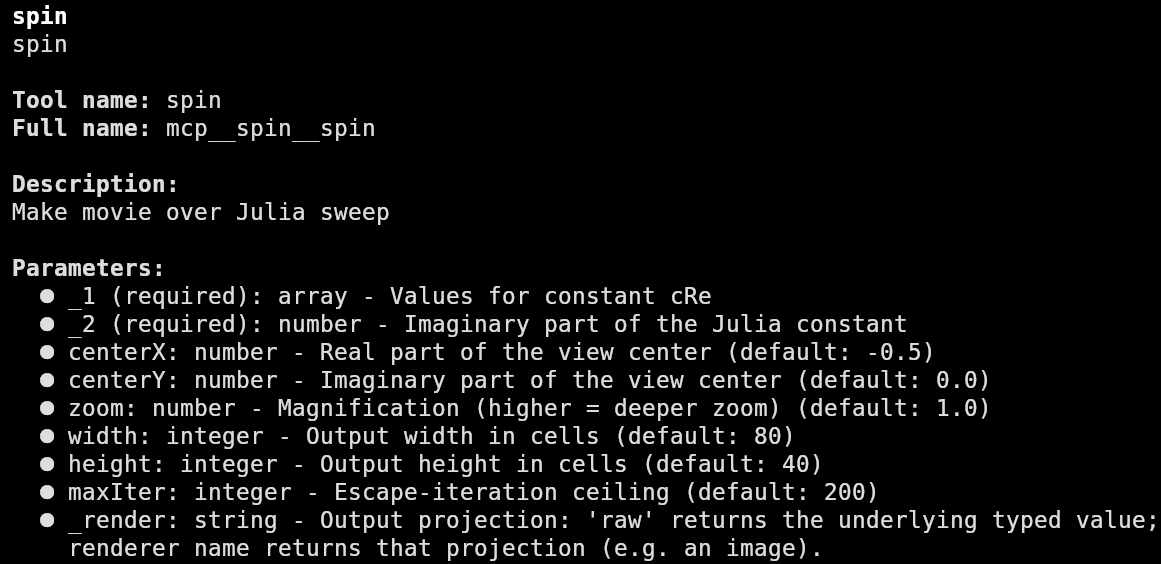
Now you can directly use these tools in Claude, here is the full help menu for
the spin movie generator in Claude:
The same core as a network server
Feeding fractal videos into your LLM is a great way to stay warm on a
winters night, but probably a more useful backend would be a conventional HTTP
server. This can be built with the --daemon-out <exe> flag. The generated
executable can serve the module over HTTP, TCP, and Unix sockets. Over HTTP a
renderer whose result carries a @mime is sent as raw bytes with a real
Content-Type:
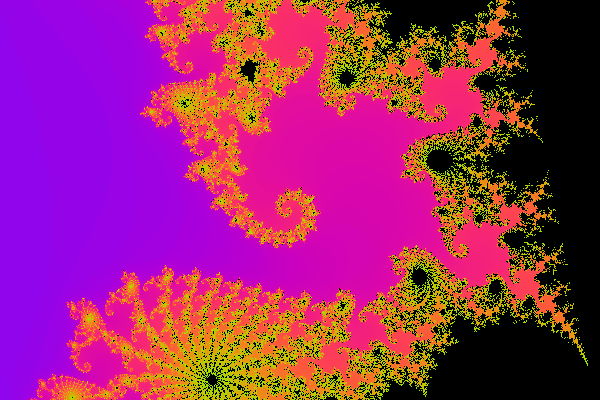 The
The mandel.png file returned from the HTTP server
$ morloc make --daemon-out spind spin.loc
$ ./spind --http-port 8080 &

$ curl -s localhost:8080/discover | jq '.result.commands[].name'
"mandel"  "julia"  "spin"

$ curl -s -i -X POST 'localhost:8080/call/mandel?render=raw' \
    -d '[{"centerX":-0.5,"centerY":0.0,"zoom":1.0,"width":6,"height":3,"maxIter":200}]'
HTTP/1.1 200 OK
Content-Type: application/json
Content-Length: 79
Connection: close
Access-Control-Allow-Origin: *
Access-Control-Allow-Methods: GET, POST, OPTIONS
Access-Control-Allow-Headers: Content-Type

{"status":"ok","result":[[3,6],[1,3,3,21,3,2,1,200,200,200,4,2,1,3,3,21,3,2]]}

$ curl -s -X POST 'localhost:8080/call/mandel?render=png' \
       -d '[{"centerX":-0.743,"centerY":0.131,"zoom":250.0,"width":600,"height":400,"maxIter":400}]' \
       -o mandel.png
The spin animation is media-typed too, so it comes back over HTTP as a normal
GIF file:
$ curl -s -X POST localhost:8080/call/mlcp_spin_gif \
    -d '[[-0.8,-0.7,-0.6,-0.5],0.156,{"width":600,"height":400,"zoom":1,"centerX":0,"centerY":0,"maxIter":200}]' \
    -o spin.gif
$ file spin.gif
spin.gif: GIF image data, version 89a, 600 x 400
So write your pure code and then generate all the interfaces with consistency guaranteed by construction. This post just covers one aspect of Morloc. I’ll write several follow-up posts focusing on different aspects of the Morloc compiler, language, and ecosystem.